The short version is that every server, switch, and workstation needs to be documented, powered down in the right order, and labeled before it leaves the rack, not after. CG Moving Company builds that documentation step into every commercial move that includes IT equipment, because the biggest risk is not breakage, it is losing track of what connects to what. If your move also involves modular furniture reconfiguration, coordinate that schedule with your IT shutdown window so the two crews are not working the same space at once.
What should you document before shutting anything down?
Photograph every rack, cable run, and port assignment first.
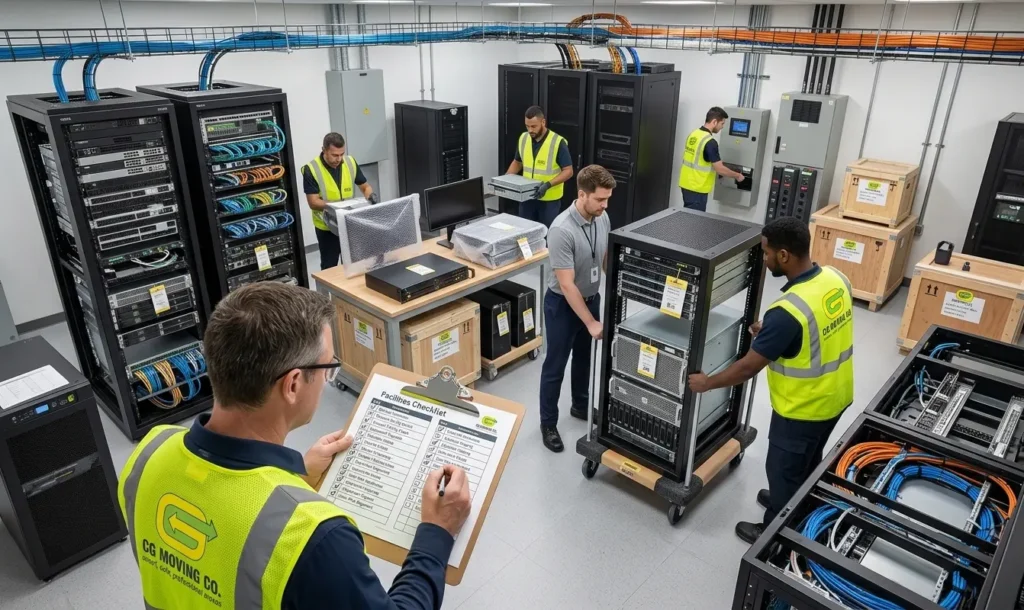
Facilities managers sometimes find out too late that nobody wrote down which cable went where. Before any equipment is disconnected, walk the server room or IT closet and document the current state. At CG Moving Company, we treat this step as mandatory on every IT-inclusive move, not optional paperwork.
At minimum, capture:
- Photos of each rack from the front and back, cables visible
- A simple map of port assignments for switches and patch panels
- Serial numbers for servers, UPS units, and networking hardware
- A list of which systems can tolerate downtime and which cannot
This takes an hour and saves a full day of guesswork during reconnection.
In what order should equipment be powered down?
Applications and databases first, then servers, then network gear last.
Powering down IT equipment out of sequence risks data corruption on anything still writing to disk. The general order is to gracefully shut down applications and databases, then the servers running them, then storage systems, and finally the network switches and routers that connect everything.
Whoever manages your systems internally should run this shutdown, even if the moving crew handles the physical disconnection and packing that follows. We coordinate our timeline around that handoff rather than working around it.
How should equipment be packed and labeled for the move?
Anti-static packing, with labels matching the pre-move documentation.
Servers and networking equipment need anti-static wrap and padded cases, not standard moving blankets. Each piece should carry a label that matches the documentation from before shutdown, including its destination rack location in the new space.
A practical labeling checklist:
- Label by destination rack and slot, not just by department
- Keep power cables and peripherals bagged with their matching unit
- Flag anything fragile or sensitive for separate, careful handling
- Keep a master inventory sheet that travels with the IT equipment, not in a separate box
What happens on the receiving end?
Equipment goes back in the same rack order, then power-up follows reverse sequence.
Reconnection should mirror the shutdown in reverse. Network gear powers up first, then storage, then servers, then applications. Equipment goes back into racks in the order documented during the walkthrough, which is why that first step matters so much.
We budget time for a facilities or IT staff member to confirm connectivity before the crew leaves the site, because catching a mislabeled cable while the team is still there is far easier than troubleshooting it after they have gone.
A clean IT move comes down to documenting before you disconnect and reconnecting in the right order. If your relocation includes a server room or data closet, our commercial moving team plans the IT shutdown window as its own phase of the project, not an afterthought squeezed into moving day. Contact us a few weeks out so we can scope the IT portion correctly.
Frequently Asked Questions
Does the Moving Crew Ever Power Equipment Down, or Does That Fall to IT Staff?
Shutdown should always be run by whoever manages your systems internally, since they know which applications and databases can tolerate being closed and in what order. Our crew handles the physical disconnection, padding, and labeling after that shutdown is complete, not the shutdown itself. We coordinate our arrival time around your IT team’s shutdown window rather than working around it.
What if a Piece of Equipment Doesn't Power Back On at the New Location?
If something doesn’t power on during reconnection, the first step is checking the pre-move photos and port map against the current setup, since a loose cable or an unseated card is the most common cause. We budget time with a facilities or IT staff member on-site specifically to troubleshoot this before our crew leaves, since it’s far easier to fix while everyone involved is still there. A true hardware failure from the move itself is rare when the documentation and padding steps were followed.
Does CG Moving Company Back Up Data Before an IT Equipment Move?
No, data backups are the responsibility of your internal IT team or managed service provider, not our crew. Our role covers the physical move: documentation, disconnection, padding, labeling, and reconnection of the hardware itself. We recommend confirming your backup is current before shutdown begins, as a standard precaution independent of the move.
Should Network Cables Be Labeled Differently From Power Cables During the Move?
Yes, we recommend labeling network cables by their port assignment on the documentation map, while power cables get bagged directly with the unit they belong to rather than labeled separately. Mixing the two labeling systems is a common source of confusion during reconnection, since a power cable rarely needs a port reference the way a network cable does. Keeping the two systems distinct speeds up the reconnection step.
If your IT team has questions about how the shutdown and our crew’s schedule should line up, have them reach out to us directly before move day.